Getting Started with Redstone Episode 4 — Observers and Clocks: How Circuits Move Automatically
This story was machine-translated from Korean.

Up until Episode 3, all the devices required a player to pull a lever or press a button to operate. But automatic farms, automatic doors, and blinking signs work without anyone touching them. The secret lies in two things. One is a component that detects changes, and the other is a circuit that turns on and off by itself.
Episode 4 of 'Getting Started with Redstone' covers these two: Observers and Clock Circuits. The key component for the first automatic farm we’ll build in Episode 5 is the observer. By the end of this episode, you’ll understand how circuits can move 'automatically' and how to use them politely on a server.
This episode is also based on Java Edition. Differences with Bedrock Edition will be noted separately. Time units are in 'game ticks'. 1 game tick is 1/20 of a second (0.05 seconds), and 2 game ticks are equivalent to a repeater set to 1 tick (0.1 seconds) as mentioned in Episode 2.
Observer — The Eye that Sees Block Changes
An observer is crafted using 6 cobblestones, 2 redstone dust, and 1 nether quartz. One side has a face, and the opposite side has a red dot. The face is the side that observes, and the red dot is the side that outputs the signal.
The observer watches the block in front of its face, and when that block changes, it sends a short signal out the back. Here, 'changes' covers a wide range of events.
- When a block is placed or broken.
- When a crop grows to the next stage or when sugarcane grows one block taller.
- When redstone dust turns on or off, or when a shulker box opens and closes, these are all block state changes.
On the other hand, there are changes that the observer does not detect, like opening and closing a chest. If the observer doesn't react, you should first question whether 'the state of that block has actually changed'.
Characteristics of Observer Signals
| Item | Details |
|---|---|
| Signal Strength | 15 (maximum) |
| Signal Length | A short pulse lasting 2 game ticks (0.1 seconds) |
| Signal Output Location | Only the back side with the red dot. |
| If there’s a block behind it, | it will strongly power that block. Blocks attached to it, like dust or pistons, can also move. |
| Signal Transmission | The observer itself does not transmit signals. |
| When moved by a piston, | if you move a powered observer, it will emit a pulse once. This property is the basis for 'flying machines'. |
Let’s also remember how to place it. The observer should be placed with the red dot facing the player. So, if you place the observer in front of the block you want to watch, its face will naturally face that block.
Observers in Bedrock Edition are slightly different. They respond to almost everything that causes block updates, have a wider detection range than Java, and only detect on odd game ticks. An observer moved by a piston will immediately emit a signal. The signal strength of 15 and length of 2 game ticks are the same.
What is a Clock?
A Clock is a circuit that endlessly repeats turning on and off. The time it takes to turn on and off once is called the period, and how many times it repeats in one second is called the frequency. The calculation is simple. Divide 20 by the period (in game ticks) to get the frequency. If the period is 4 game ticks, it repeats 5 times per second.
The principle of a clock comes down to one thing: it feeds its output back as its input, but with a delay in between. The signal repeatedly turns off and on while it makes a loop. In this episode, we’ll look at three easy ones for beginners to make.
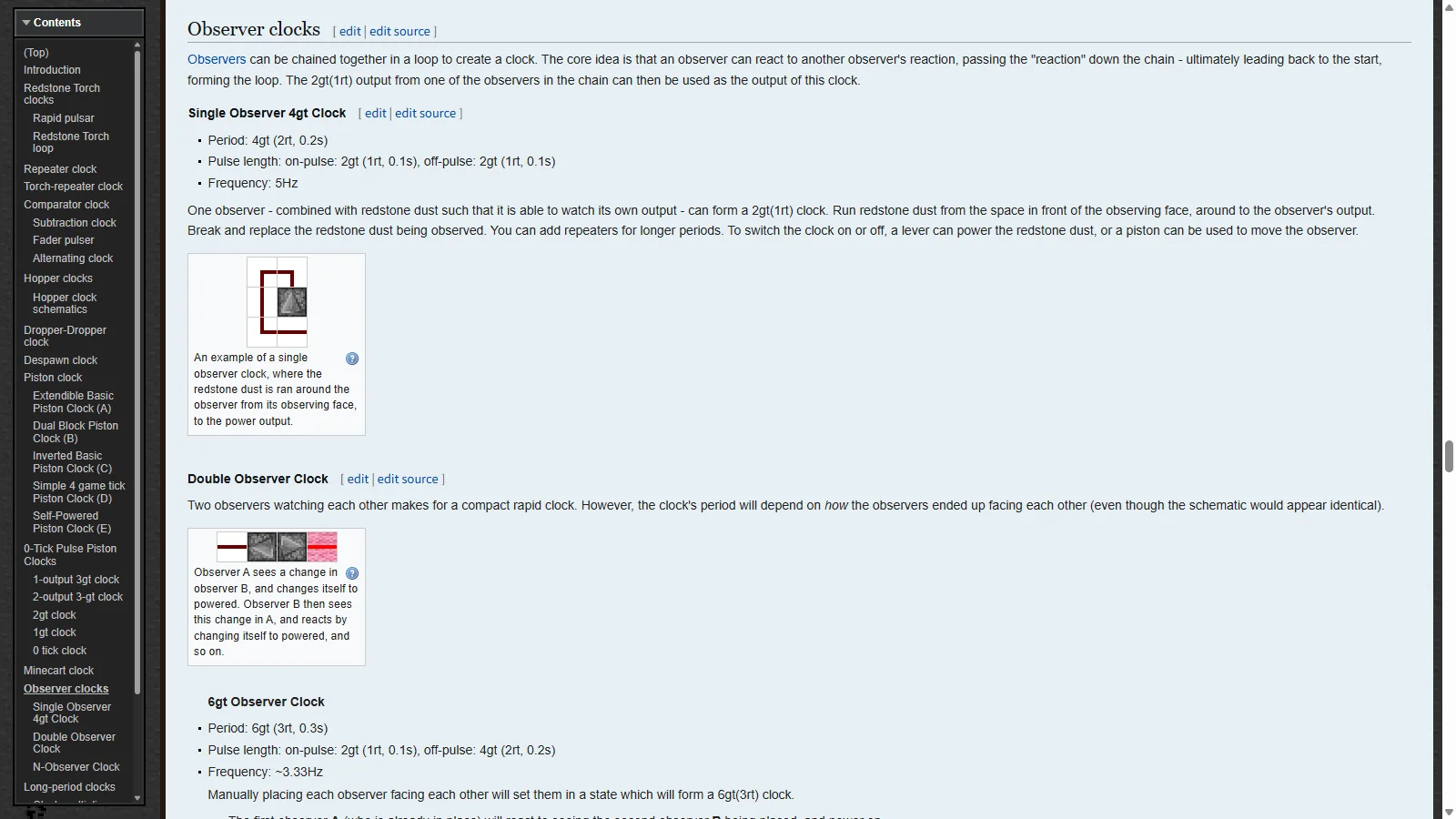
① Observer Clock — Just two blocks.
This is the simplest clock. You just need to place two observers facing each other's faces.
- Place Observer A.
- In front of A's face, place Observer B so that it faces A. Now their faces are looking at each other.
- The moment B is placed, A detects that change and turns on. Then B detects A's change and turns on, and A sees B again… it repeats endlessly.
When placed by hand, the period is 6 game ticks (0.3 seconds, about 3.3 times per second). It turns on for 2 game ticks and off for 4 game ticks. If you push one observer with a piston to connect them, the period becomes 4 game ticks (5 times per second). It’s interesting how the period changes depending on how they are connected, even though they look the same.
The output is taken from the red dot side of the two observers. To stop it, break one of the observers or push them apart with a piston.
Practice — Sound Block to Match the Beat Place a sound block behind one of the observers (the red dot side) of the observer clock. The sound block will make a 'tick tick tick' sound about three times per second whenever the pulse comes. You can confirm the clock's rhythm with your ears, which you couldn't see before. Once confirmed, break the observer to stop it.
You can create a clock with just one observer. Start with redstone dust in front of the observer, loop it around to connect to the back (output) of the observer, and it will see its own output turning the dust on and off, sending a signal again. If you break and replace the dust you're watching, it will start. Adding a repeater in the middle of the loop will increase the cycle length.
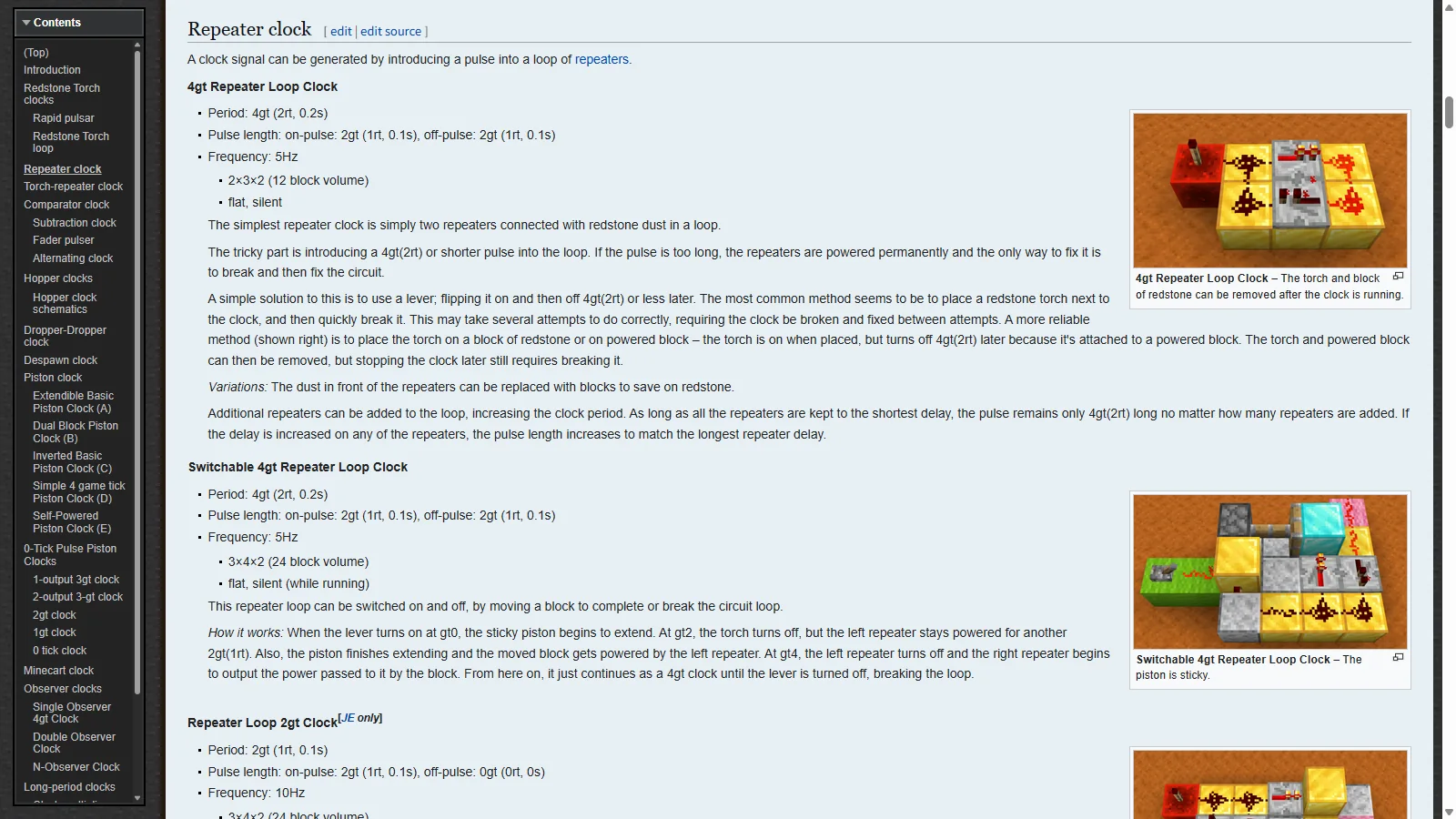
② Repeater Clock — A loop that adjusts speed
This is made using the repeater we learned about in episode 2. The simplest form is a loop connecting two repeaters with redstone dust.
- Set up a 2×3 area on the ground. Place the two repeaters in the middle facing opposite directions.
- Lay redstone dust on the four outer blocks to create a circular loop where the front of one repeater connects to the back of the other.
- Insert a very short pulse into the loop once.
The tricky part is step 3. If both repeaters are set to 1 tick, the starting pulse must be 4 game ticks or less. If it's longer, the entire loop will stay on, and you'll have to break and rebuild the circuit. A lever or button will be too long.
The reliable method recommended by the wiki is as follows. Place a redstone torch on a redstone block next to the loop. The torch turns on the moment it's placed, but since it's attached to the block receiving the signal, it will automatically turn off after 4 game ticks (as mentioned in episode 1, 'the torch turns off when it receives a signal from the block it's attached to'). Once you have a pulse of exactly 4 game ticks, you can remove the torch and redstone block.
| Repeater Settings | Results |
|---|---|
| Both set to 1 tick | Cycle of 4 game ticks, 5 times per second (2 ticks on, 2 ticks off) |
| Adding another 1-tick repeater | The pulse stays the same, but the cycle length increases. |
| Increasing one repeater's tick setting | The pulse lengthens by the longest delay, and the cycle also gets longer. |
The repeater clock is silent and flat. However, to stop it, you need to break the loop. The wiki has a 'switch-type' design using a sticky piston to insert and remove a block to open and close the loop. It's based on the same principle as the piston door in episode 3.
③ Comparator Clock — A circuit that turns off by itself
In episode 2, we learned about the subtraction mode of the comparator. This mode outputs only the difference between the back signal and the side signal. The comparator clock feeds its output back into its side.
- When a signal of 15 comes in from the back, the comparator outputs 15.
- As this signal travels around the dust to the side, it weakens to 14 after one block. The comparator then outputs 15−14=1.
- A strength of 1 doesn't make it back to the side. Since the side signal becomes 0, the comparator outputs 15 again. It returns to 1 tick.
This way, the output changes every 2 game ticks, resulting in a cycle of 4 game ticks, blinking 5 times per second. The back input can be a lever or a redstone block, and it will work as long as the strength is 2 or more. However, the only place where it actually 'turns off and on' is the dust next to the comparator, while the front alternates between 15 and 1. When pulling the output to another device, it's safer to extend the dust a few blocks further until the strength drops to 0. There are designs that fit in a compact 2×2 area, but let's focus on understanding the principle first.
When to use a clock and when not to
A clock creates a signal to 'do something at regular intervals.' It can be used to blink redstone lamps, make dispensers operate at a steady rhythm, or harvest crops with pistons at set times. The MinecraftWiki's high-density pumpkin and watermelon farm design uses a clock to move pistons, and it's recommended to have a cycle of 5-6 seconds or more. Farms work well with slow clocks. If a longer cycle is needed, you can use a hopper clock that takes advantage of the time items take to move between hoppers, but since the cycles differ between Java and Bedrock, I'll just mention it here.
However, in many cases, a clock isn't necessary at all. If you want to know whether sugarcane has fully grown, instead of using a clock that checks multiple times per second, you can use an observer that sends a signal only once when it grows. The sugarcane farm in the next episode is an example of this. A circuit that only moves when there's a 'change' is always lighter than one that 'constantly' moves.
Why high-speed clocks are a problem on servers
Minecraft servers calculate the world 20 times per second, every game tick. If there are too many tasks to complete in that 0.05second, the ticks get delayed, and the game slows down for all players. This is what's known as 'lag.'
Clocks notify surrounding blocks every time the signal changes. If a clock blinks 5 times per second and moves 10 pistons, that means the pistons are expanding and contracting 100 times in one second. Blocks moved by pistons and lamps that change brightness require a lot of calculations. If such a clock runs for hours in a base without anyone around, the entire server pays the price. The wiki also warns that in fast clocks blinking more than 10 times per second, pistons may behave as if they are constantly on. So, very fast clocks create lag and don't function properly.
Five Server Clock Etiquettes
- Create a way to turn it off (lever, piston switch) for every clock.
- Make it as slow as necessary. A few seconds between cycles is enough for farms.
- Consider whether you can detect changes with an observer instead of a clock.
- Turn it off when you leave.
- Check the server rules. Some servers prohibit or limit high-speed clocks.
Episode 4 Summary
- Observers send a pulse of strength 15 and 2 game ticks once when the block in front changes.
- Clocks repeatedly turn on and off by feeding their output back as input. The frequency is 20 ÷ cycle (game ticks).
- Observer clocks face each other, repeater clocks rely on a short starting pulse, and comparator clocks turn off by themselves in subtraction mode.
- On the server, you can use observers to make it slow and possible.
In episode 5, we finally combine the observer with the piston from episode 3 to build our first automatic farm. When sugarcane grows, the observer detects it, the piston cuts it, and the hopper collects it into a chest. If the circuit gets stuck, ask on the MINECAP question board with a screenshot.
Reference materials
Want to talk about this story?
Share your take with other Minecraft players on MINECAP.